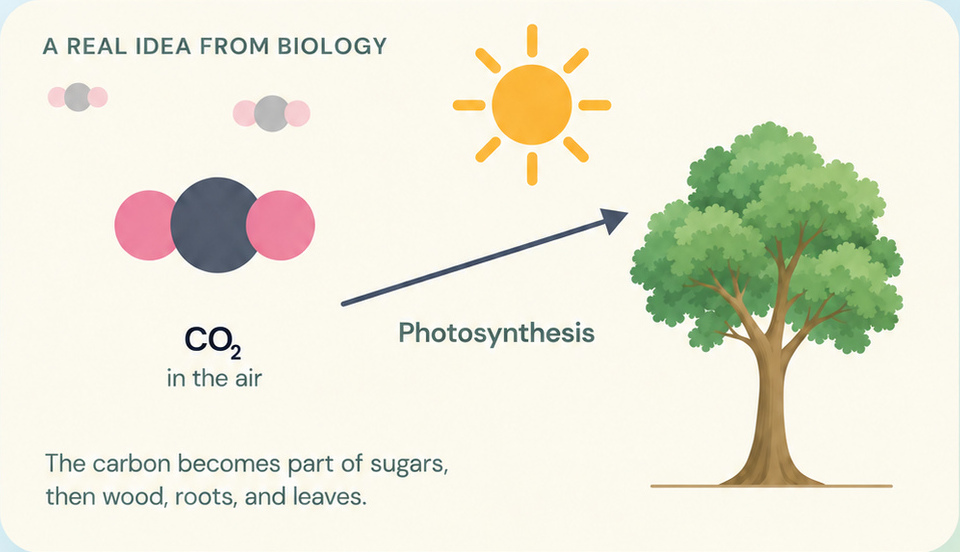
Where does a tree
get its carbon?
From carbon dioxide in the air.
School Practice · Grades 5 to 12
The courses your learner is taking now become about 10 minutes of focused recall practice each day. Ideas that are harder to recall come back sooner, so what they learn in class stays ready for the next grade and the move into middle school or high school.
Built around the courses they are taking now and the foundations on which later learning builds.


Or start on the web
7 days free. No credit card needed.
Available on iPhone, iPad, Android, the web, and Chromebooks.
Free for 7 days, no credit card needed. One sign-in on iPhone, Android and the web.
Get the MemClick app
 Scan to get the app on your phone
Free for 7 days. Sign in with the same phone number on the web, iPhone or Android.
Where does a tree
get its carbon?
From carbon dioxide in the air.
Start in minutes
Create your parent account on the web or in the MemClick app. No credit card is needed.
Choose their grade, school where supported, and the courses they are taking.
Start practice on this device, then pass it to your learner. Or link their device so they can study independently.
Their first focused practice is ready. A typical session takes about 10 minutes.
One account connects the parent view and each learner’s practice.
The years ahead
MemClick keeps important knowledge returning before and during those transitions, helping learners carry more of what they have learned into what comes next.
One math idea, followed from Grade 5 to Algebra I.
Grade 5 plots the points (1, 2), (2, 4), (3, 6).
Grade 5 practice revisits important math, English, science, and social studies ideas that sixth-grade work builds on.
Grade 7 joins the points (1, 2), (2, 4), (3, 6) into the line y = 2x.
Grades 6 to 8 keep all four core subjects in regular recall practice as concepts become more connected and demanding.
Grade 8 lifts the line y = 2x up by 1, to y = 2x + 1.
Grade 8 foundations remain in practice as learners prepare for courses such as Algebra I, Biology, English 9, and high-school history.
Algebra I asks “In y = mx + b, what does b represent?” about the line y = 2x + 1, and marks b where it meets the y-axis.
Selected high-school courses use the same focused daily practice to keep essential course knowledge available across the school year and into later courses.
About 10 minutes a day
One focused question asks your learner to bring an answer back from memory.
They say how the recall felt: Not yet, Almost there, Got it, or Easy.
Ideas that are harder to recall come back sooner. Reliable recall allows a longer gap before the next practice.
Trying to remember is the practice. Spacing those attempts over time helps make later recall more reliable.
See exactly how MemClick works →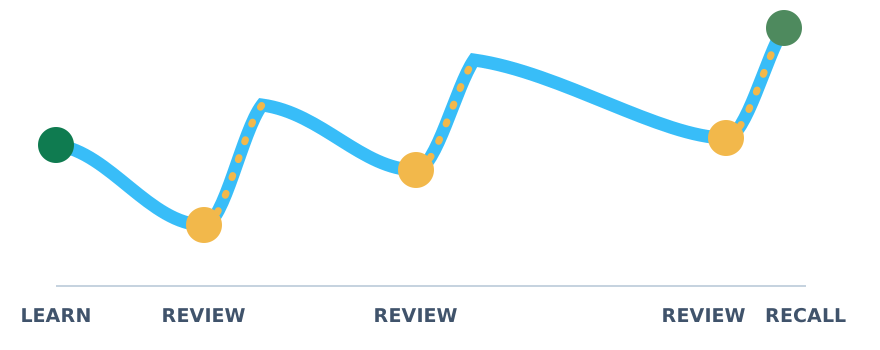
MemClick visual explanations
After the learner recalls the answer, a short MemClick visual explanation can make a difficult concept clearer.
The explanation supports understanding. Then MemClick returns to recall practice so the learner has another opportunity to retrieve the idea from memory.
Grades & courses
MemClick uses your learner’s grade and courses to prepare practice around what they are learning at school. Where school matching is supported, MemClick also uses the school’s course list.
See grades & courses →Grades 5 to 8: English Language Arts, Math, Science, and Social Studies in every grade.
Additional courses are added only after they complete quality review.
For parents
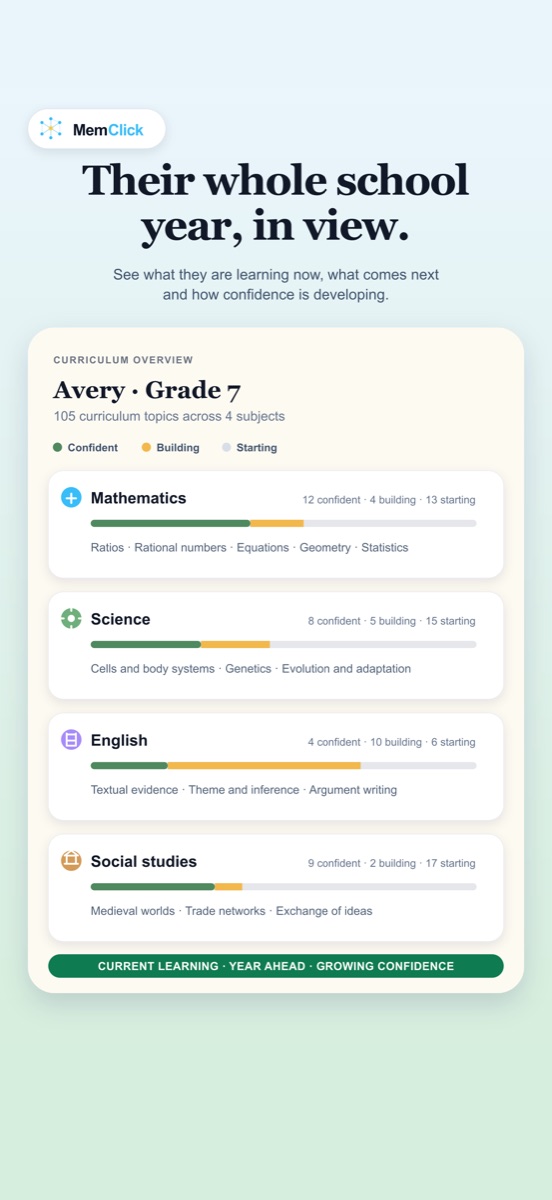
Your parent view shows recent practice, subjects, and how topics are developing.
You can see what your learner is working on, which ideas are returning, and how their school learning connects to the work ahead.
No grades. No public scores. No leaderboards.
Simple family pricing
$4.99/month
or$44.99/year
Save 25%
That is $3.75/month equivalent for the whole family on the annual plan.
7 days free. No credit card needed. Cancel anytime.
Built for learning
Cards are written with the help of AI, then reviewed for accuracy, age-appropriate wording, and alignment with the course before learners practice them. There is no learner chatbot.
How we build it →Common questions
MemClick School Practice is built for learners in Grades 5 to 12. All four core subjects are available in Grades 5 to 8, with a growing set of high-school courses.
Later grades build on earlier knowledge. MemClick keeps important foundations returning through short recall practice so they remain more available when learners encounter more advanced work.
MemClick builds practice around the learner’s grade and selected courses. Where school matching is supported, it also uses the school’s course list. Otherwise, course content follows the standards for that grade and subject.
No. MemClick works alongside school. Teaching introduces and develops the ideas. MemClick gives important knowledge repeated recall practice so learners have more opportunities to remember it later.
No. There is no learner chatbot. Cards are prepared in advance with the help of AI and reviewed before they reach learner practice.
MemClick works on iPhone, iPad, Android, the web, and computers or Chromebooks through a browser.
Why I built MemClick
I built MemClick with my twin boys because I wanted the knowledge they worked hard to learn at school to still be there when the next lesson, next grade, or next school asked for it. The goal has stayed simple: short, focused practice that helps learning last.
Start with 7 days free. Practice together on this device, or link their device for independent study. Follow their progress from your parent account.
7 days free. No credit card needed.


